Quick comparison
| App | Platforms | Meeting bot | Free plan | Best for |
|---|---|---|---|---|
| Convoxa | iPhone, iPad, Mac, Apple Watch | None | 2 hours of recording, one time | Apple users who want a choice of on-device or cloud processing |
| Granola | Mac, Windows, iOS, Android | None | Basic plan; older notes need an upgrade after 30 days | Bot-free meeting notes across platforms |
| Otter | Mac, Windows, iOS, Android, web | Optional | 300 minutes a month, up to 30 minutes per conversation | Teams that want an assistant to join meetings |
| Apple Notes and Voice Memos | Built into Apple devices | None | Included | Occasional recordings and simple transcripts |
Plans change often, so check each company's pricing page before you decide.
What to look for
- Where you meet. Calls and in-person conversations need different capture. A bot can't help with a coffee chat, and a phone in your pocket isn't ideal for a video call.
- Who joins the call. Decide whether an extra participant is acceptable in your meetings.
- Where processing happens. Check whether your audio is uploaded, how long it's kept, and whether it's used for training.
- Whether you can verify the note. AI notes can be wrong. A good app makes it easy to get back to what was really said.
- Languages. Confirm your language is supported in the mode you plan to use.
Convoxa
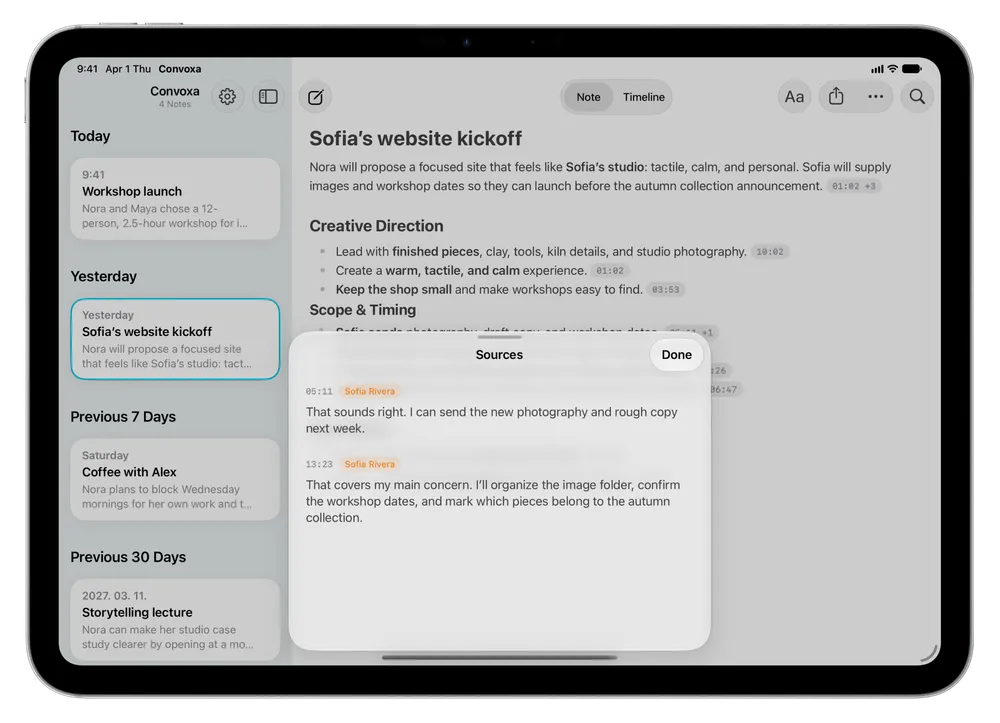
Best for people who live on Apple devices. Convoxa is our app, built for iPhone, iPad, Mac, and Apple Watch. You choose how each conversation is processed: On Device runs transcription, speaker labels, and notes on your device with Apple Intelligence, while Cloud uses Convoxa AI for our highest accuracy and 60+ languages.
It records Mac calls without a bot and works for in-person conversations too. You can add photos and typed thoughts while recording, then follow a source marker or replay the audio to check a note. Your library syncs through your own iCloud account on every plan.
Keep in mind: Convoxa is Apple-only, with no Windows or Android app. On Device needs a device with Apple Intelligence, and the app requires version 26 of each operating system. See plans and pricing.
Granola
Best for bot-free notes beyond Apple. Granola uses your computer's audio instead of joining the meeting, and it's available on macOS, Windows, iOS, and Android. If your team isn't all on Apple devices, it's the stronger fit.
Keep in mind: Granola's pricing page lists audio as deleted after transcription on all plans. That suits some people, but if you want to replay the original moment, it's worth knowing before you choose.
Otter
Best for teams that want an assistant in the meeting. Otter offers an AI agent that joins Zoom, Teams, and Google Meet to write and share notes. It also has desktop apps for bot-free recording, and it's available across Mac, Windows, mobile, and the browser.
Keep in mind: the free plan limits monthly minutes and conversation length, so long meetings may need a paid plan.
Apple Notes and Voice Memos
Best if you only need the occasional transcript. Apple's own apps are already on your devices and cost nothing extra. Notes on Mac can record and transcribe audio in supported languages on Macs with Apple silicon.
Keep in mind: they're general tools, not meeting tools. For a regular run of meetings, you'll do more of the organizing and follow-up yourself. Our iPhone transcription guide compares the built-in options.
Our recommendation
- On Apple devices, with in-person conversations or sensitive calls: try Convoxa.
- On a mixed team, or on Windows or Android: look at Granola.
- Want a shared assistant in your meetings: look at Otter.
- Only record a few times a year: start with Apple's apps.